DOMIQ integration with Zabbix
Archived post from 2013, recovered from my old blog. The technology described here is probably out of date. Original at the Internet Archive.
If you already have a configured Zabbix monitoring system its very easy to integrate it with DOMIQ Base to collect and process any metrics of your intelligent home.
The idea is to use a script running on DOMIQ Base to directly update Zabbix server on every change of a monitored channel. The updates are done using Zabbix sender protocol.
This approach does not require any mediator between the two systems.
Here is the list of steps needed:
-
create a host representing DOMIQ Base
-
for each channel to be monitor create a host item. Use channel name as a name of a host item (eg. LCN.value.0.10.r1)
-
on the Logic tab of DOMIQ Base configurator add the following LUA script:
zabbixUrl = 'zabbixHost:10051' -- zabbix instance domiqHost = 'domiq' -- must match host name created in step 1 -- a function to decode LCN temperatures and send them to Zabbix function zabbixTemp(channel, value) zabbix(channel, (value - 1000) / 10 ) end -- a function to push a channel value to Zabbix function zabbix(channel, value) s1,s2 = channel:find('E.') if s1 == 1 then channel = channel:gsub('E.', '') end msg = '{"request":"sender data", "data": [ {"host":"' .. domiqHost ..'", "key":"' .. channel .. '", "value":"' .. value .. '"} ]}' command('C.TCP.send.' .. zabbixUrl .. '=ZBXD' .. string.char(0x01) .. string.char(string.len(msg)) .. string.char(0x00, 0x00, 0x00, 0x00, 0x00, 0x00, 0x00) .. msg) end -
on the Events tab of DOMIQ Base configurator add appropriate triggers to call either zabbix or zabbixTemp functions, for example:
- channel: E.LCN.value.0.(.+) (a filter to match the events)
- action type: channel
- action name: C.LOGIC
- action value: zabbixTemp(‘$C0′, ‘$D0′) (call zabbixTemp function with channel name as a first argument and channel value as a second argument)
If you intend to add a large number of metrics you may export a single item host configuration into an XML file to have a kind of a template, then based on it generate an XML for the whole list of channels using a tool or programming language of your choice and then import it back.
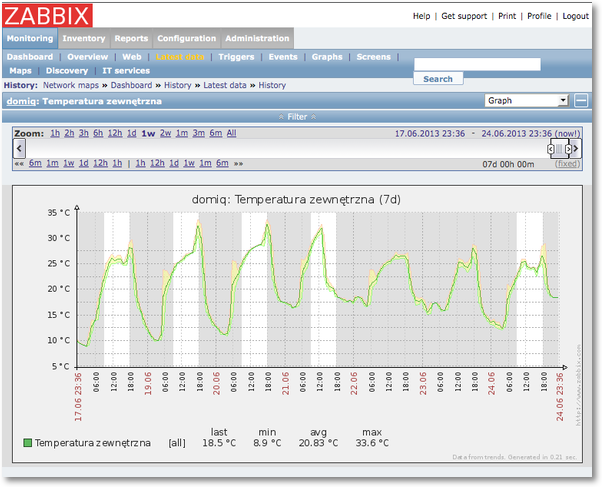
Once the data are being collected you can visualise them and process like any other metrics monitored by Zabbix.
Note that the above solution works with Zabbix version 2.0 or higher.